We are incredibly excited to introduce Drivebase, the self-hosted file manager designed to bring all your storage together.
In today's digital world, our files are scattered everywhere. You might have personal photos on Google Drive, project backups on AWS S3, and media collections on a local home server. Accessing them means jumping between different apps, managing multiple logins, and dealing with fragmented interfaces.
Drivebase changes that.
What is Drivebase?
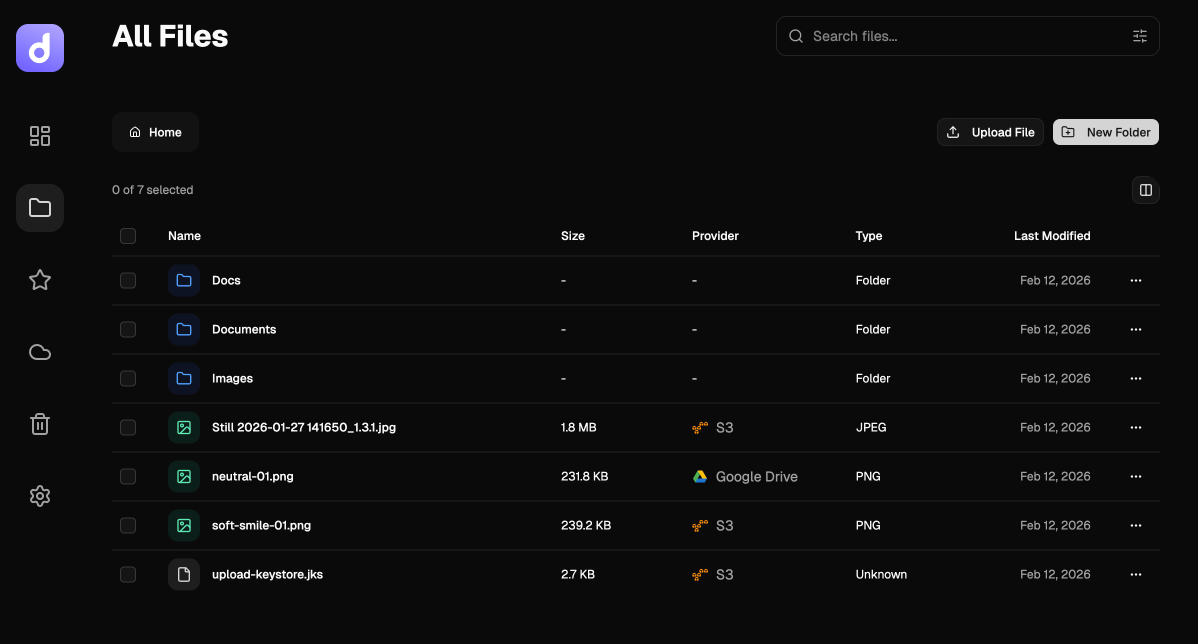
Drivebase is a unified, self-hosted file manager that lets you connect, organize, and manage all your storage providers from a single, beautiful dashboard.
Think of it as your own private "Dropbox," but with the power to connect to the storage backends you already use—like AWS S3, Google Drive, and your local disk.
Why We Built It
We wanted a solution that gave us the convenience of modern cloud storage with the privacy and control of self-hosting.
1. Unify Your Digital Life
Stop switching tabs. Drivebase aggregates your S3 buckets, Google Drive folders, and local directories into one seamless interface. View, move, and organize files as if they were all on one drive.
2. Virtual Folder Structure
Storage providers have rigid structures. Drivebase introduces a Virtual File System, allowing you to create folders and organize content exactly how you want, regardless of where the file physically lives.
3. Complete Privacy & Control
Your data belongs to you. Drivebase is open-source and self-hosted. You run it on your own hardware or private server, ensuring your file metadata and access logs never leave your control.
Key Features
- Multi-Provider Support: Connect AWS S3 (and compatible services like MinIO), Google Drive, and Local Storage out of the box.
- Modern Interface: A clean, intuitive UI for uploading, downloading, renaming, and organizing files.
- Universal Search: Instantly find any file across all your connected providers.
- Favorites & Recent: improved navigation to access your most important files quickly.
- Drag & Drop: smooth file management experience.
Getting Started
Drivebase is designed to be up and running in minutes. We provide an automated installer that sets up everything you need using Docker.
One-Line Installation
Run this command on your machine or server:
curl -fsSL https://drivebase.one/install | bashThis will set up Drivebase along with the necessary database services, so you can start managing your files immediately.
Check out our Documentation for detailed guides on connecting your first storage provider.
Join the Community
Drivebase is open source, and we are building it for you. We have an exciting roadmap ahead, including mobile apps, file sharing, and more integrations.
Take back control of your storage with Drivebase.